PhilHealth MDR: Member Data Record Guide A-Z [2026]
PhilHealth MDR, or Member Data Record, is an important document that contains your PhilHealth membership information in one place. It shows details such as your PhilHealth Identification Number, personal information, membership status, employer details, and registered dependents.
If you need your MDR for a hospital, employment, government transaction, or to check your membership details, you may be wondering how to get it and whether you can access it online.
The good news is that you can check and obtain your PhilHealth MDR through available PhilHealth services without always needing to visit a PhilHealth office. The exact process depends on your membership details and the service available to you.
In this guide, you will learn what a PhilHealth MDR is, what information it contains, how to get or check your MDR, how to update incorrect information, and what to do if you cannot access your record.
What Is PhilHealth MDR?
PhilHealth MDR stands for Member Data Record. It is a document that contains the important information recorded in your PhilHealth membership account. It helps you check whether your personal and membership details are correctly registered with the Philippine Health Insurance Corporation.
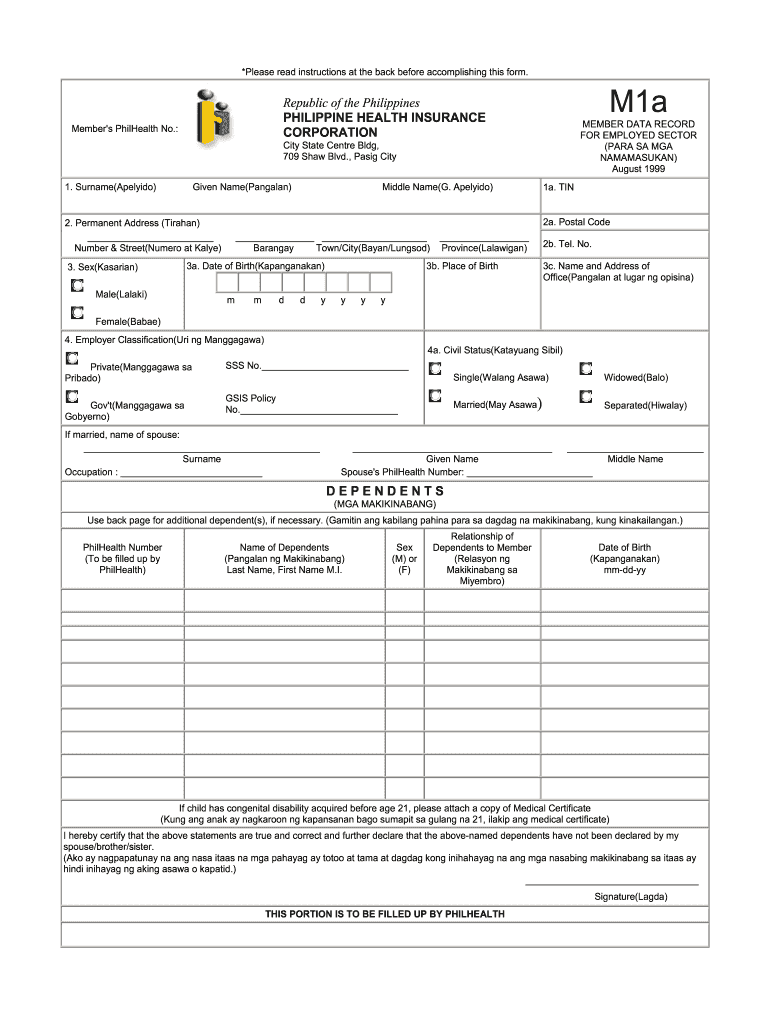
Your PhilHealth MDR may include your PhilHealth Identification Number (PIN), name, date of birth, membership category, employer information, and registered dependents or beneficiaries. It can also help you confirm whether the information in your PhilHealth record is up to date.
An MDR is commonly requested when you need to verify your PhilHealth membership information or complete certain transactions. For example, you may need it when dealing with employment requirements, updating your membership details, or processing PhilHealth related documents.
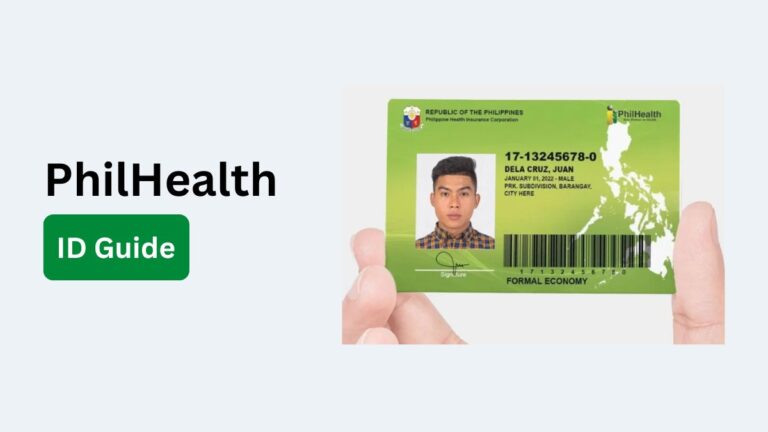
Unlike a PhilHealth ID, the MDR is not primarily used as an identification card. Instead, it provides a detailed summary of the information associated with your PhilHealth membership.
What Information Is Included in a PhilHealth MDR?
A PhilHealth MDR contains the key information recorded in your PhilHealth membership account. It allows you to review your personal details, membership status, and registered dependents in one document. The exact information shown may vary depending on your membership record.
Some of the common details included in a PhilHealth MDR are:
- PhilHealth Identification Number (PIN): Your unique PhilHealth membership number used to identify your account.
- Personal Information: Your registered name, date of birth, sex, and other basic personal details.
- Membership Information: Your membership category, status, and other details related to your PhilHealth coverage.
- Employer Information: Details about your current or previous employer when these are recorded in your PhilHealth account.
- Dependents and Beneficiaries: The names and relevant details of dependents registered under your PhilHealth membership.
- Contribution Information: Membership contribution details recorded in your PhilHealth account, where applicable.
- Membership Category: Information showing whether you are registered under an applicable member category, such as employed, self earning, or other PhilHealth membership classifications.
Why Is a PhilHealth MDR Important?
A PhilHealth MDR is important because it gives you a clear record of the information registered under your PhilHealth membership. Checking your MDR can help you spot incorrect or outdated details before they cause problems during a PhilHealth transaction or benefits claim.
Here are some of the main reasons why your PhilHealth MDR is useful:
- Verifies your membership details: Your MDR lets you check important information connected to your PhilHealth account, including your PIN and membership information.
- Helps with PhilHealth transactions: Some transactions may require you to provide or verify your PhilHealth membership details. Having your MDR available can make this process easier.
- Confirms registered dependents: You can review the dependents recorded under your membership and check whether their information is correct.
- Helps identify incorrect information: Reviewing your MDR can help you notice errors in your name, date of birth, address, membership category, or other registered details.
- Useful for updating your records: If you find outdated or incorrect information, your MDR can help you determine which details need to be corrected.
- Provides proof of recorded information: An MDR gives you a convenient record of the membership information currently associated with your PhilHealth account.
- Useful for employment and other requirements: Employers or institutions may ask for PhilHealth related information as part of certain administrative processes. An MDR can help you provide accurate details when required.
- Makes it easier to keep your records updated: Regularly checking your MDR helps ensure that your PhilHealth information remains accurate and complete.
Who Can Get a PhilHealth MDR?
PhilHealth MDR is generally available to registered PhilHealth members who have a membership record with the Philippine Health Insurance Corporation. It provides a summary of the information associated with the member’s PhilHealth account.
The people who may have a PhilHealth MDR include:
- Employed members: Employees registered with PhilHealth through their employer can have an MDR showing their membership information.
- Self-employed members: Individuals who are registered and paying their own PhilHealth contributions may also have an MDR.
- Voluntary members: Members who maintain their PhilHealth membership through voluntary contributions can request or access their membership record.
- Senior citizens: Qualified senior citizen members can have PhilHealth membership records and an MDR containing their registered information.
- Overseas Filipino Workers (OFWs): Registered OFW members may have an MDR containing their PhilHealth membership details.
- Sponsored members: Individuals whose PhilHealth contributions are covered by a sponsor or government program may also have membership records.
- Members with registered dependents: A member can have an MDR that includes eligible dependents registered under their account.
PhilHealth MDR Requirements
The requirements for getting a PhilHealth MDR depend on how you request it and whether you are simply viewing your existing record or updating your membership information. PhilHealth currently provides online access to MDR through its Member Portal, where members can view or print their record.
For transactions that require an in person request or an update to your MDR, you may need the following:
- PhilHealth Member Registration Form (PMRF): A properly completed PMRF may be required when updating your membership information. PhilHealth instructs members to mark the form as “FOR UPDATING” when amending their records.
- Valid government issued ID: A valid photo and signature bearing ID may be required when processing an MDR related request, particularly when the member is personally making the request.
- Authorization letter: If someone is requesting or processing the record on your behalf, an authorization letter from the member may be required.
- Valid IDs of the member and representative: When using a representative, PhilHealth may require identification documents from both the member and the person processing the request.
- Supporting documents: Additional documents may be necessary when you are correcting personal information, adding dependents, or making other changes to your membership record. The required document depends on the specific information being changed.
- Proof of dependency: If you are adding or correcting information about a dependent, appropriate documents such as birth or marriage certificates may be required depending on the relationship and circumstances.
How to Get PhilHealth MDR Online
You can get your PhilHealth Member Data Record (MDR) online through the PhilHealth Member Portal. The portal allows registered members to access their PhilHealth records and view or print their MDR without having to visit a PhilHealth office.
Step 1: Open the PhilHealth Member Portal
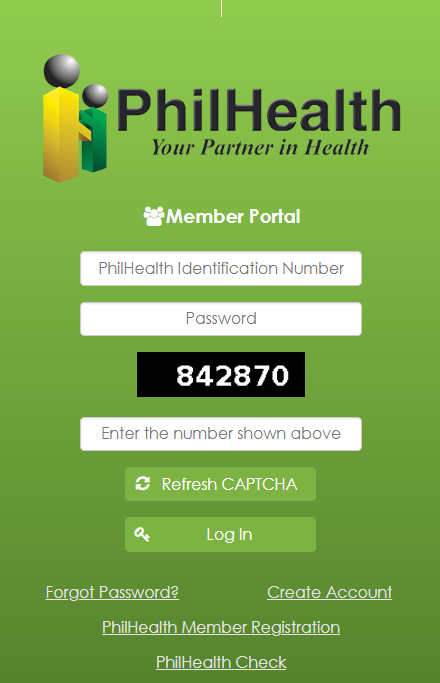
Go to the official PhilHealth Member Portal using a phone, tablet, laptop, or desktop computer with an internet connection. The portal is PhilHealth’s online service for accessing membership records, contribution information, and MDR.
Step 2: Log In to Your Member Portal Account
Enter your registered login details to access your PhilHealth account.
If you already have a Member Portal account, use your existing credentials to sign in. PhilHealth’s portal requires members to have an account before they can access their online membership records.
Step 3: Register If You Do Not Have an Account
If you have not registered for the Member Portal yet, create an account using your PhilHealth membership information.
PhilHealth previously stated that members can register using their PhilHealth Identification Number (PIN) and create their own username and password. An account activation or confirmation may also be required through the registered email address.
Step 4: Access Your Membership Records
After logging in, look for the section that provides access to your PhilHealth membership information.
The Member Portal allows members to check their records and verify details such as their name, date of birth, address, employer, and registered dependents.
Step 5: View Your PhilHealth MDR
Select the option to view your Member Data Record (MDR). Review the information carefully to make sure your personal and membership details are correct.
The current PhilHealth Online Services page specifically lists the Member Portal as a service where members can access their MDR online and view or print it.
Step 6: Print or Save Your MDR
Once your MDR is displayed, use the available print option to create a physical copy. You can also save the document digitally if the portal provides the appropriate download or print-to-PDF option on your device.
Keeping a digital copy can make it easier to provide your PhilHealth membership information when needed.
Step 7: Check Your MDR for Errors
Before using the document, check your name, PhilHealth Identification Number, address, employer information, dependents, and other details.
If you find incorrect or outdated information, you should have your PhilHealth membership record updated. PhilHealth provides a separate process for amending member data, which involves completing the PhilHealth Member Registration Form (PMRF) and submitting it to a PhilHealth office.
How to Get PhilHealth MDR Through a PhilHealth Office
If you prefer to get your PhilHealth Member Data Record (MDR) in person, you can request a copy through a PhilHealth office. PhilHealth’s service guidelines provide for the issuance of existing MDRs, and PhilHealth Express outlets can also process MDR requests. The service has no fee under the published PhilHealth service procedure.
Step 1: Visit a PhilHealth Office or PhilHealth Express Outlet
Go to a PhilHealth Local Health Insurance Office (LHIO) or a PhilHealth Express outlet that provides MDR services. PhilHealth states that its Express outlets can issue existing MDRs to members and prospective members.
Step 2: Bring a Valid ID
If you are requesting your own MDR, bring a valid photo and signature bearing ID. PhilHealth’s published requirements specify a photocopy of the member’s valid ID for this type of request.
Step 3: Get and Complete the Request Form
At a PhilHealth Express outlet, you may need to fill out a request form. The published procedure states that the frontline officer provides the form and a queuing number before processing the request.
Step 4: Submit Your Request
Submit the completed request form and required identification documents to the PhilHealth frontline officer when your number is called. The staff will check your information and process the MDR request.
Step 5: Wait for Your MDR to Be Printed
Once your request has been processed, the PhilHealth staff can print your existing MDR. The published PhilHealth Express procedure lists the printing and release of the MDR as part of the same transaction.
Step 6: Check Your MDR Before Leaving
Review the printed MDR carefully. Check your name, PhilHealth Identification Number, date of birth, membership information, employer details, and registered dependents. If you find incorrect information, ask the PhilHealth staff about the appropriate process for updating your record.
What If Someone Else Will Request Your MDR?
If a representative will request the MDR on your behalf, additional documents are required. These include an original authorization letter and valid photo and signature bearing IDs for the member and representative.
How Much Does It Cost to Get a PhilHealth MDR?
The published PhilHealth procedure for requesting an existing MDR through PhilHealth Express lists no service fee.
How Long Does It Take to Get a PhilHealth MDR at a PhilHealth Express Outlet?
PhilHealth’s published procedure lists approximately 5 minutes for the request and another 5 minutes for printing and release, although the actual waiting time can vary depending on the office and number of clients.
How to Update Information on Your PhilHealth MDR
If any information on your PhilHealth MDR is incorrect or outdated, you should update your membership record with PhilHealth. This may include changes to your name, address, civil status, membership category, or registered dependents. PhilHealth’s official process requires members to use the PhilHealth Member Registration Form (PMRF) and submit it to a PhilHealth office.
Step 1: Download the PhilHealth Member Registration Form
Get a copy of the PhilHealth Member Registration Form (PMRF) from the PhilHealth website or a PhilHealth office. The PMRF is the form used to amend member information.
Step 2: Mark the Form as “FOR UPDATING”
On the upper right hand corner of the PMRF, select or mark “FOR UPDATING.” This tells PhilHealth that you are requesting changes to an existing membership record.
Step 3: Enter Your Updated Information
Complete the PMRF with the correct information. Only provide the details that need to be changed along with the other required membership information.
Step 4: Prepare Supporting Documents
Some changes require supporting documents. For example, adding or updating a dependent may require documents that prove the relationship. The exact documents depend on the type of amendment you are requesting.
Step 5: Submit the PMRF to PhilHealth
Submit the completed PMRF and applicable supporting documents to the nearest PhilHealth office. PhilHealth’s published amendment procedure applies to existing members and their dependents.
Step 6: Wait for Your Updated MDR
After PhilHealth processes the amendment, your membership record will be updated. You can then request or receive a printout of your updated Member Data Record (MDR).
PhilHealth MDR vs PhilHealth ID
A PhilHealth MDR and PhilHealth ID are two different things, although both are connected to your PhilHealth membership. The MDR contains detailed membership information, while the PhilHealth ID is used to identify you as a PhilHealth member. PhilHealth’s services and registration procedures treat the MDR and identification card as separate documents.
What Is a PhilHealth MDR?
The Member Data Record (MDR) is a document that shows information recorded in your PhilHealth membership account. It can include your PhilHealth Identification Number, personal information, membership details, and registered dependents.
You can access your MDR online through the PhilHealth Member Portal, where members can view or print their MDR.
What Is a PhilHealth ID?
The PhilHealth Identification Card (PIC) is an identification document issued to PhilHealth members. It is different from the MDR because it is designed to identify the member rather than provide a detailed record of membership information.
PhilHealth’s registration procedures show that members may receive both an MDR and a PhilHealth ID card after completing the registration process.
PhilHealth MDR vs PhilHealth ID Comparison
| Feature | PhilHealth MDR | PhilHealth ID |
|---|---|---|
| Full name | Member Data Record | PhilHealth Identification Card |
| Main purpose | Shows your PhilHealth membership information | Identifies you as a PhilHealth member |
| Contains detailed membership information | Yes | No |
| Shows PhilHealth Identification Number | Yes | Yes |
| Shows registered dependents | Yes, where applicable | No |
| Used to review membership details | Yes | No |
| Used as an identification document | Not primarily | Yes |
| Available online | Yes, through the Member Portal | Not the same online service |
| Can be printed | Yes | Physical card |
| Can contain updated membership information | Yes | The card itself is not a detailed membership record |
| Can be requested separately | Yes | Yes, depending on applicable PhilHealth services |
When Do You Need a PhilHealth MDR?
A PhilHealth MDR is useful whenever you need to verify or provide the membership information recorded in your PhilHealth account. It can be particularly important when processing PhilHealth benefits, checking your dependents, or updating your membership details. PhilHealth currently also allows members to view or print their MDR through the Member Portal.
- For PhilHealth benefit claims: Some PhilHealth benefit procedures require a copy of the MDR along with the applicable claim documents.
- For hospital admission: An MDR may be requested as part of the documents needed when availing certain PhilHealth benefits at an accredited health facility.
- For checking your membership information: You can use your MDR to review the information recorded in your PhilHealth membership account.
- For verifying registered dependents: The MDR can help you confirm whether your qualified dependents are properly listed. PhilHealth notes that dependents should be declared and listed in the principal member’s MDR to help ensure hassle free benefit availment.
- For updating incorrect information: If your name, address, civil status, membership details, or other information is outdated, your MDR can help you identify what needs to be corrected. PhilHealth provides a process for updating member records and issuing an updated MDR.
- For employment related transactions: Employers may need PhilHealth membership information when registering employees. PhilHealth’s employer registration procedure includes the issuance of the PIN and MDR for registered employees.
- For keeping a personal membership record: Having a current MDR gives you a convenient copy of the information associated with your PhilHealth membership.
- When an institution specifically requests an MDR: If a hospital, employer, government office, or another authorized organization asks for your PhilHealth MDR, you can access or print it through the Member Portal or request it through an appropriate PhilHealth office.
Is PhilHealth MDR Free?
Yes. Getting a PhilHealth Member Data Record (MDR) does not normally require a service fee. PhilHealth’s published service information lists the issuance of an MDR under its records request services as having no service fee.
You can request your MDR through the appropriate PhilHealth service channel without paying a separate fee for the document. PhilHealth also provides an online Member Portal where members can access their records and view or print their MDR online.
However, being a PhilHealth member and getting an MDR are different from paying your required PhilHealth premium contributions. While the MDR itself may be free, applicable membership contributions still need to be paid according to your membership category and contribution requirements.
If you are requesting an MDR through a representative, you may need to provide additional documents such as an authorization letter and valid IDs. These requirements do not mean that you have to pay a fee for the MDR itself.
How Long Is a PhilHealth MDR Valid?
A PhilHealth MDR does not have a fixed expiration date in the same way that some certificates or IDs do. It is a record of the information currently registered in your PhilHealth membership account. PhilHealth’s current procedures focus on keeping the MDR updated rather than assigning a specific validity period to every MDR.
This means an MDR you printed several months ago may still show your membership information, but it may not be the best document to submit if your personal information, dependents, employer, or membership details have changed. PhilHealth provides a process for updating member data and then obtaining an updated MDR.
It is also important to separate MDR validity from membership or benefit eligibility. Your MDR is a record of your membership information, while your eligibility for benefits can depend on your current membership status and applicable PhilHealth rules. PhilHealth advises members to keep their MDR updated and maintain the applicable premium requirements for active coverage.