
PhilHealth Online Registration: Step-by-Step Guide [2026]
PhilHealth online registration allows eligible Filipinos to apply for PhilHealth membership from the comfort of their home without the need to spend hours waiting at a PhilHealth office. The process is designed to make registration faster, easier, and more convenient for employees, self-employed individuals, voluntary members, OFWs, and other qualified applicants.
Getting registered with PhilHealth is an important step to access healthcare benefits and ensure your membership records are properly created. Whether you are a first-time member or need to update your information, understanding the online registration process can help you avoid common mistakes and delays.
In this guide, you will learn everything about PhilHealth online registration, including the requirements, step-by-step application process, account creation, membership verification, common issues, and helpful tips to complete your registration successfully.
What Is PhilHealth Online Registration?
PhilHealth online registration is the digital process that allows individuals to apply for PhilHealth membership or manage their membership information through online platforms without visiting a PhilHealth office.
It provides a convenient way for eligible Filipinos to submit their personal details, complete registration requirements, and receive their PhilHealth identification information electronically.
Through online registration, first-time members can start their PhilHealth membership application, while existing members can access services such as updating personal records, checking membership details, and managing their account information through the PhilHealth online system.
The online registration process is available for different types of members, including employed individuals, self-employed professionals, voluntary members, overseas Filipino workers (OFWs), and other qualified applicants. It helps reduce paperwork, saves time, and makes PhilHealth services more accessible to members across the Philippines and abroad.
To complete PhilHealth online registration, applicants usually need to provide accurate personal information and submit the required documents based on their membership category. Once the application is processed, members can use their PhilHealth membership details when accessing healthcare benefits and related services.
Why Register for PhilHealth Online?
Registering for PhilHealth online makes the membership process faster and more convenient compared to traditional registration methods. Instead of spending time traveling to a PhilHealth office and waiting in long queues, applicants can complete many registration steps digitally from anywhere with an internet connection.
The main benefits of PhilHealth online registration include:
- Saves time and effort: Online registration allows applicants to complete the process without visiting a PhilHealth branch. It reduces waiting time and makes it easier for busy individuals to apply at their convenience.
- Easy access from anywhere: Members can start their registration process whether they are at home, at work, or living abroad. This is especially helpful for OFWs and individuals who cannot easily visit a PhilHealth office.
- Faster membership application process: Digital registration helps streamline the submission of personal information and required details, making the overall application process more efficient.
- Convenient account management: Registered members can access online services to review their membership information, update certain details, and manage their PhilHealth records more easily.
- Reduces paperwork: Online registration minimizes the need for physical forms and manual processing, helping applicants complete requirements in a more organized way.
- Helps avoid registration errors: The online system guides applicants through required fields, making it easier to provide complete and accurate information before submitting an application.
- Improves access to healthcare benefits: Having an active PhilHealth membership ensures that qualified members can use available healthcare benefits when needed.
- Useful for first-time members: New applicants can begin their PhilHealth membership journey online without needing to understand complicated office procedures beforehand.
- Provides easier record tracking: Online access helps members keep track of their registration details and important PhilHealth information whenever they need it.
Who Can Register for PhilHealth Online?
PhilHealth online registration is available for eligible individuals who want to become members or manage their existing membership information digitally.
The registration process is designed to serve different groups, including workers, self-employed individuals, Filipinos living abroad, and other qualified citizens who want access to PhilHealth healthcare benefits.
The following individuals can register for PhilHealth online:
- Employed Individuals: Private and government employees can register for PhilHealth membership online. Employers usually facilitate employee registration, but individuals can also check and manage their membership details through online services.
- Self-Employed Professionals and Business Owners: Freelancers, entrepreneurs, consultants, and individuals earning income through their own businesses can register online as self-employed PhilHealth members and manage their contribution records.
- Voluntary Members: Individuals without a current employer, including former employees or those who want to continue their PhilHealth coverage independently, can apply for voluntary membership online.
- Overseas Filipino Workers (OFWs): Filipino workers living and working abroad can register or update their PhilHealth membership online to maintain access to healthcare benefits and keep their records updated.
- Senior Citizens: Qualified senior citizens can register their PhilHealth membership to access healthcare coverage and benefits provided under PhilHealth programs.
- Students and Young Adults: Students and young adults who meet PhilHealth eligibility requirements can apply for membership online, especially if they need their own membership record.
- Unemployed Individuals: Individuals without formal employment may register under the appropriate PhilHealth membership category to maintain healthcare coverage.
- Former Members Who Need to Reactivate Their Records: Previous PhilHealth members who need to update or continue their membership can use online services to manage their existing records.
- Filipino Citizens Without Existing PhilHealth Membership: Any qualified Filipino citizen who does not yet have a PhilHealth number can start the registration process online and create their membership record.
Read Also: Philhealth Employer Login
PhilHealth Online Registration Requirements
Before starting your PhilHealth online registration, it is important to prepare the necessary information and documents to avoid delays during the application process. The requirements may vary depending on your membership category, such as employed, self-employed, voluntary, or OFW status.
Having complete and accurate details ready can help you finish the registration smoothly and ensure that your PhilHealth records are created correctly.
The common PhilHealth online registration requirements include:
- Complete Personal Information: Applicants need to provide basic personal details, including their full name, date of birth, civil status, address, contact information, and other required identification details.
- Valid Email Address and Contact Number: A working email address and mobile number are usually required for account verification, receiving registration updates, and accessing online PhilHealth services.
- Valid Identification Documents: Applicants may need to provide a valid government-issued ID or supporting documents to verify their identity. Accepted documents may include a passport, driver’s license, national ID, or other recognized identification cards.
- Birth Certificate or Proof of Identity: Some applicants may need to submit a birth certificate or another official document that confirms their personal information.
- Employment Details for Employed Members: Employees may need to provide information related to their employer, including company details and employment status, depending on the registration process.
- Proof of Income or Business Information for Self-Employed Members: Self-employed individuals, freelancers, and business owners may need documents or information related to their source of income or business activity.
- OFW-Related Information for Overseas Members: Overseas Filipino Workers may need to provide employment details, overseas work information, or supporting documents related to their status abroad.
- Dependent Information (If Applicable): Members who want to register dependents should prepare details and supporting documents for qualified dependents, such as spouses, children, or parents.
- Accurate Membership Information: Applicants should ensure that all submitted details match their official records to prevent duplicate accounts, incorrect membership records, or processing delays.
- Digital Copies of Required Documents: Since the registration process is completed online, applicants may need clear scanned copies or photos of required documents ready for uploading.
How to Register for PhilHealth Online
Registering for PhilHealth online is a straightforward process when you have all the required information ready. By following the correct steps, you can submit your application, receive your PhilHealth Identification Number (PIN), and begin accessing PhilHealth services without unnecessary delays.
While the exact interface may change over time, the overall registration process remains similar.
Step 1: Visit the Official PhilHealth Online Portal
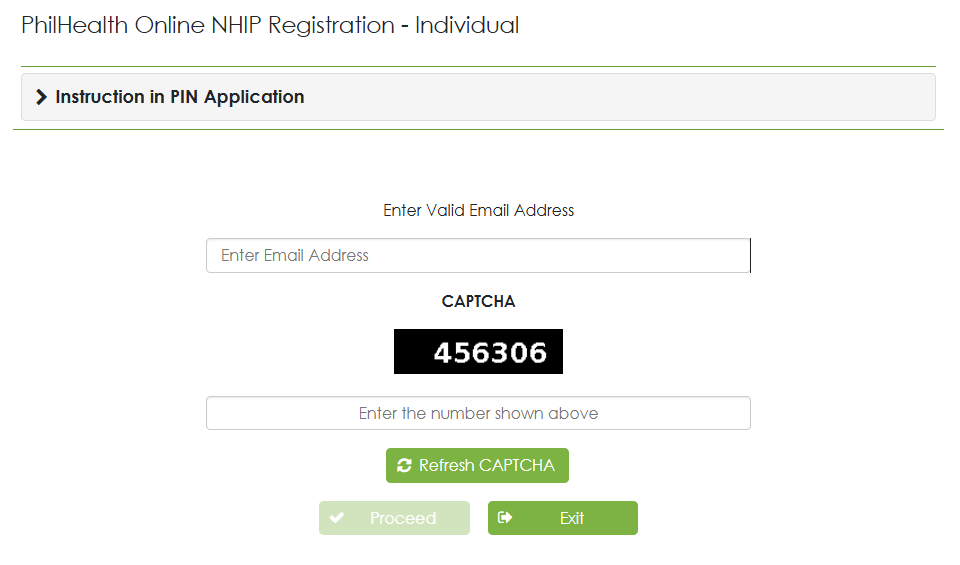
Go to the official PhilHealth website and navigate to the online registration or Member Portal section. Always use the official website to protect your personal information and avoid fraudulent websites.
Step 2: Create Your Online Account
If you are a first-time user, register for an online account using your email address and other required details. Create a strong password and verify your email if prompted.
Step 3: Complete the Registration Form
Fill out the online application form with accurate personal information. This typically includes your full name, birth date, sex, civil status, address, contact details, and other required information. Double-check every field before moving to the next step.
Step 4: Select Your Membership Category
Choose the membership type that best matches your current status, such as employed, self-employed, voluntary, OFW, or another eligible category. Selecting the correct category helps ensure your records are processed properly.
Step 5: Upload the Required Documents
Upload clear digital copies of the required documents, such as valid identification and other supporting documents applicable to your membership category. Make sure the files are readable and meet the upload requirements.
Step 6: Review Your Information
Carefully review all the information you entered before submitting your application. Correct any errors to avoid delays in processing or issues with your membership record.
Step 7: Submit Your Registration
Once you have confirmed that all information is correct, submit your online registration. You should receive a confirmation or reference number that you can use to track your application.
Step 8: Wait for Application Processing
PhilHealth will review your submitted information and documents. Processing times may vary depending on the volume of applications and whether additional verification is needed.
Step 9: Receive Your PhilHealth Identification Number (PIN)
After your registration is approved, you will receive your PhilHealth Identification Number if you are a new member. Keep this number in a safe place, as you will need it when accessing PhilHealth services and benefits.
Step 10: Log In to Manage Your Membership
After completing your registration, sign in to your PhilHealth online account whenever needed to check your membership details, update your information, monitor your contributions, and access other available online services.
How to Register Through the PhilHealth Member Portal
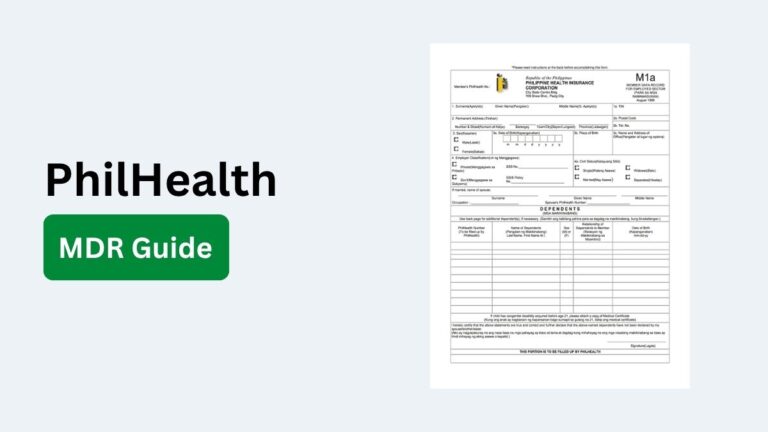
The PhilHealth Member Portal provides a secure and convenient way for eligible individuals to register, access their membership information, and manage various PhilHealth services online. Once your account is created, you can view your Member Data Record (MDR), monitor contributions, update certain information, and use other available online features without visiting a PhilHealth office.
Visit the PhilHealth Member Portal
Open the official PhilHealth website and navigate to the Member Portal under the Online Services section. Make sure you are using the official portal to protect your personal information from fraudulent websites.
Create Your Member Portal Account
Select the registration option and enter the required information, such as your email address, personal details, and other requested information. If you are a new member registering through the portal, follow the on-screen instructions to complete your account setup.
Verify Your Email Address
After submitting your registration, PhilHealth will send an email verification link to your registered email address. Open the email and activate your account by clicking the verification link. Your account must be verified before you can access Member Portal services.
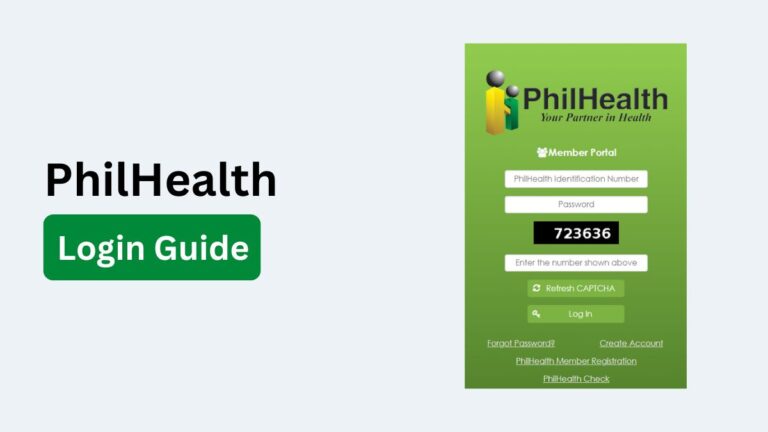
Log In to Your Account
Once your email has been verified, sign in using your registered email address and password. You can now access the dashboard and available online services.
Complete or Confirm Your Membership Details
Review all your personal and membership information carefully. If you are registering for the first time, complete any remaining required fields. Existing members should verify that their records are accurate before using PhilHealth services.
Access Available Online Services
After successfully logging in, you can use various online features, including:
- View and download your Member Data Record (MDR)
- Check your PhilHealth membership information
- View your contribution history
- Pay eligible premium contributions online
- Select your Konsulta provider where applicable
Keep Your Account Information Updated
Regularly update your contact details and other personal information whenever changes occur. Keeping your records current helps ensure you receive important notifications and can access PhilHealth benefits without unnecessary delays.
How to Register for PhilHealth Online as a First-Time Member
If you have never been a PhilHealth member before, you can complete your first-time registration by providing your personal information, selecting the appropriate membership category, and submitting the required documents through the official PhilHealth registration process. Once your application is approved, you will receive your permanent PhilHealth Identification Number (PIN), which you will use for future contributions and healthcare transactions.
Confirm That You Are a First-Time Applicant
Before registering, make sure you do not already have an existing PhilHealth Identification Number (PIN). PhilHealth issues only one permanent PIN to each member, and duplicate registrations should be avoided.
Prepare the Required Information and Documents
Gather all the necessary information before starting your application. This typically includes your personal details, a valid government-issued ID, a working email address, a mobile number, and any additional documents required for your membership category. Having everything ready helps speed up the registration process.
Choose the Correct Membership Category
Select the membership category that matches your current situation, such as employed, self-employed, voluntary, Overseas Filipino Worker (OFW), or another eligible category. Choosing the correct category ensures your membership record is processed correctly.
Complete the Online Registration Form
Enter your personal information carefully and ensure every detail matches your official documents. Incorrect information may delay the approval of your application or require future corrections.
Upload Supporting Documents
If requested, upload clear and readable copies of your identification documents and any additional supporting files. Make sure the uploaded files meet the required format and size limits.
Submit Your Application
Review all the information one final time before submitting your registration. After submission, keep any confirmation message, reference number, or email acknowledgment for future reference.
Wait for Application Approval
PhilHealth will review your application and verify the information you submitted. Processing times may vary depending on the completeness of your application and the number of registrations being processed.
Receive Your PhilHealth Identification Number (PIN)
Once your registration is approved, you will receive your permanent PhilHealth Identification Number (PIN). Keep this number secure because it will be required when paying contributions, updating your membership information, and accessing PhilHealth benefits.
Access Your PhilHealth Online Account
After becoming an official member, sign in to the PhilHealth Member Portal to view your Member Data Record (MDR), monitor your contributions, update eligible information, and access other online member services.
Common Problems During PhilHealth Online Registration
Although PhilHealth online registration is designed to be simple and convenient, some applicants may experience issues during the application process. Most of these problems are caused by incorrect information, missing documents, technical errors, or system maintenance. Knowing the common issues in advance can help you complete your registration with fewer delays.
Below are some of the most common problems encountered during PhilHealth online registration:
- Unable to Access the PhilHealth Website: The registration portal may be temporarily unavailable because of system maintenance, heavy traffic, or technical issues. If this happens, try accessing the website again after some time.
- Email Verification Not Received: Some applicants do not receive the verification email immediately. Check your spam or junk folder, confirm that your email address was entered correctly, and request another verification email if needed.
- Incorrect Personal Information: Entering the wrong name, birth date, address, or other personal details can delay the approval process. Always review your information carefully before submitting your application.
- Invalid or Blurry Document Uploads: Poor-quality scans or photos of identification documents may be rejected. Upload clear, readable copies that meet the required file format and size.
- Duplicate PhilHealth Registration: Registering again when you already have an existing PhilHealth Identification Number (PIN) can create duplicate records and processing issues. Verify whether you already have a PIN before applying.
- Application Submission Errors: Some users may encounter error messages while submitting the registration form due to internet interruptions, browser compatibility issues, or temporary server problems.
- Slow Website Performance: The online portal may become slow during peak hours when many users are accessing the system. Waiting a while and trying again later often resolves this issue.
- Incomplete Registration Form: Missing required fields or leaving mandatory information blank may prevent the application from being submitted successfully. Make sure every required section is completed.
PhilHealth Online Registration Fees
PhilHealth online registration itself is completely free. There is no fee for creating a PhilHealth membership, obtaining a PhilHealth Identification Number (PIN), or registering through the official PhilHealth online system. However, after becoming a member, you may be required to pay monthly or periodic premium contributions depending on your membership category and applicable PhilHealth policies.
The table below provides a quick overview of the fees associated with PhilHealth online registration.
| Service | Registration Fee | Additional Cost |
|---|---|---|
| PhilHealth Online Registration | Free | None |
| Creating a PhilHealth Member Portal Account | Free | None |
| Issuance of PhilHealth Identification Number (PIN) | Free | None |
| Updating Membership Information | Free | None |
| Adding or Updating Dependents | Free | None |
| Downloading Member Data Record (MDR) | Free | None |
| Checking Membership Status | Free | None |
| Printing Membership Records | Free | None |
| Monthly Premium Contributions | Varies | Depends on membership category and current PhilHealth contribution schedule |
| Online Payment Processing | May vary | Some payment channels may charge a separate convenience fee |
How Long Does PhilHealth Online Registration Approval Take?
The approval time for PhilHealth online registration depends on the completeness of your application, the accuracy of the information you provide, and the volume of applications being processed by PhilHealth.
If all required details and supporting documents are submitted correctly, your application may be processed within a few business days. However, applications that require additional verification or contain missing or incorrect information can take longer. You should regularly check your registered email address and the PhilHealth Member Portal for updates regarding your application status.
If your application remains pending for an extended period, you can contact PhilHealth customer support or visit the nearest PhilHealth office for assistance.