PhilHealth Employer Registration: New Employers Guide 2026
If you are hiring employees in the Philippines, PhilHealth employer registration is one of the first legal steps you need to complete. It allows your business to enroll workers, remit monthly contributions, and provide access to essential healthcare benefits under the National Health Insurance Program.
Many new employers are unsure where to begin. Questions about eligibility, required documents, online registration, and employer responsibilities can make the process seem confusing. The good news is that registration is straightforward when you know the correct steps.
This guide explains everything you need to know about PhilHealth employer registration. You will learn who must register, the documents you need, how to complete the registration online or at a PhilHealth branch, how to register employees, and what to do after approval.
It also covers common registration issues and practical solutions to help you complete the process with confidence.
What Is PhilHealth Employer Registration?
PhilHealth employer registration is the process of officially registering a business or organization with PhilHealth so it can provide mandatory health insurance coverage to its employees.
After registration, the employer receives a PhilHealth Employer Number (PEN), which is used to manage employee records, submit monthly contribution reports, and remit contributions.
This registration is required for businesses that hire employees in the Philippines, including private companies, government agencies, household employers, and other organizations covered by Philippine labor laws.
It helps ensure that employees receive PhilHealth benefits, such as financial assistance for hospitalization, medical treatments, and other covered healthcare services.
Once registered, employers can access the PhilHealth Employer Portal to enroll new employees, update employee information, generate contribution reports, and monitor payment records.
Keeping your employer account active and your employee records accurate is essential for staying compliant with PhilHealth requirements and ensuring uninterrupted healthcare benefits for your workforce.
Who Needs to Register as a PhilHealth Employer?
Any business or individual that hires employees in the Philippines must register as a PhilHealth employer. Registration ensures workers receive mandatory health insurance coverage and allows employers to comply with Philippine labor and social insurance laws. Below are the groups that are generally required to register.
- Private employers: Companies, corporations, partnerships, and sole proprietorships with one or more employees must register with PhilHealth before remitting employee contributions.
- Household employers: Individuals who employ household workers such as housekeepers, nannies, caregivers, cooks, or drivers are required to register and provide PhilHealth coverage for eligible workers.
- Government employers: National government agencies, local government units, government owned and controlled corporations, and other public institutions must register as PhilHealth employers for their employees.
- Sole proprietors and self-employed individuals with employees: Business owners who hire staff, even if they operate as a sole proprietorship or small enterprise, must complete employer registration and report employee contributions.
- Nonprofit organizations and educational institutions: Foundations, charities, schools, universities, and other nonprofit organizations with paid employees are also required to register and fulfill PhilHealth employer obligations.
- Foreign companies operating in the Philippines: Businesses with registered operations and employees in the Philippines must register with PhilHealth and comply with local contribution and reporting requirements.
Benefits of Registering as a PhilHealth Employer
Registering as a PhilHealth employer does more than fulfill a legal requirement. It helps protect your employees, keeps your business compliant, and gives you access to essential employer services. Whether you run a small business or a large company, registration offers several important benefits.
- Comply with Philippine labor laws: Employer registration helps your business meet PhilHealth requirements and avoid penalties for noncompliance.
- Provide healthcare coverage for employees: Registered employers can enroll eligible employees so they can access PhilHealth benefits for hospitalization, medical treatments, and other covered healthcare services.
- Receive a PhilHealth Employer Number (PEN): After approval, you will receive a unique Employer Number that is used for contribution reporting, payments, and employer transactions.
- Access the PhilHealth Employer Portal: Registered employers can log in to manage employee records, submit reports, verify contributions, and monitor account activity online.
- Simplify contribution management: Registration makes it easier to calculate, report, and remit monthly PhilHealth contributions accurately and on time.
- Build employee trust and satisfaction: Providing mandatory health insurance benefits shows your commitment to employee welfare and helps create a positive workplace.
- Reduce administrative issues: Keeping employee information and contribution records in one system makes future updates and audits more efficient.
- Support business growth: A properly registered business can hire new employees with confidence, knowing it is meeting its legal obligations and providing required employee benefits.
PhilHealth Employer Registration Requirements
Before starting your PhilHealth employer registration, gather all the necessary documents and business information. Having everything ready helps prevent delays and ensures your application is processed smoothly. The exact requirements may vary depending on your business type, but the following are the most commonly requested.
- Completed employer registration form: Fill out the required PhilHealth employer registration form with accurate business details.
- Business registration certificate: Submit proof that your business is legally registered, such as a certificate from the appropriate government agency.
- Business Identification Number: Prepare your Tax Identification Number (TIN) and other applicable business identification details.
- Business information: Provide your official business name, registered address, contact number, email address, and nature of business.
- Owner or authorized representative details: Include the name, position, contact information, and valid identification of the business owner or authorized representative.
- Employee information: Prepare a list of employees who will be enrolled, including their full names, PhilHealth Identification Numbers (if available), and employment details.
- Proof of business address: Some registrations may require documents that verify your registered business address.
- Valid government issued IDs: The business owner or authorized representative may need to present valid government issued identification during registration.
- Authorization letter or board resolution: If someone other than the business owner is processing the registration, an authorization letter or board resolution may be required.
- Additional supporting documents: Depending on your business structure, PhilHealth may request additional documents to verify your registration details before approval.
How to Register as a PhilHealth Employer Online
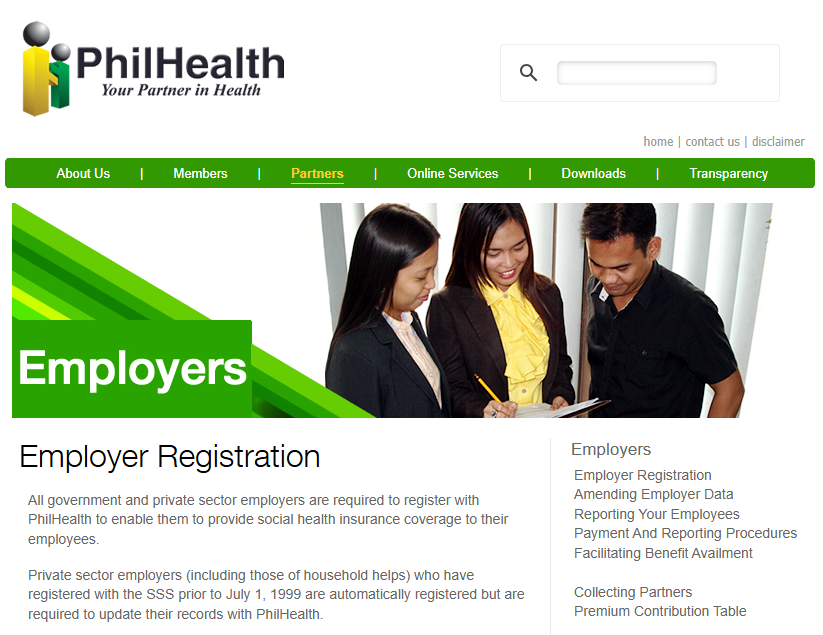
PhilHealth allows employers to register online, making the process faster and more convenient. By preparing your business information and required documents in advance, you can complete the registration with minimal delays.
Follow these steps to create your employer account and receive your PhilHealth Employer Number.
Step 1: Visit the PhilHealth Employer Registration Portal
Go to the official PhilHealth Employer Registration Portal using a secure web browser. Make sure you are on the official PhilHealth website before entering any business information. This helps protect your account and personal data.
Step 2: Create Your Employer Account
Select the option to register as a new employer. Provide a valid email address, create a strong password, and complete any verification steps required to activate your account. Use an email address that your business can access regularly because important notifications will be sent there.
Step 3: Complete the Employer Information Form
Fill in all required business details, including your business name, Tax Identification Number (TIN), business address, contact information, and business type. Double check every field before moving to the next step, as incorrect information may delay approval.
Step 4: Upload the Required Documents
Upload clear and readable copies of the required supporting documents, such as your business registration certificate and any other documents requested during the application. Ensure the files meet the portal’s size and format requirements.
Step 5: Review and Submit Your Application
Carefully review all the information you entered. Verify that your business details and uploaded documents are accurate and complete. Once everything is correct, submit your employer registration application through the online portal.
Step 6: Receive Your Employer Number and Confirmation
After your application is reviewed and approved, PhilHealth will issue your PhilHealth Employer Number (PEN). You will receive a confirmation through the portal or your registered email. Once approved, you can log in to the Employer Portal, register employees, and begin submitting monthly contribution reports.
How to Register as a PhilHealth Employer at a Branch Office
If you prefer in person assistance, you can register your business at any PhilHealth branch office. This option is helpful if you have questions about the requirements or need help completing the registration forms. Bring all required documents to avoid delays during processing.
Step 1: Prepare the Required Documents
Gather all the documents needed for employer registration before visiting the branch. These typically include your business registration certificate, Tax Identification Number (TIN), valid government issued ID, business information, and other supporting documents required for your business type. Having complete documents helps speed up the application process.
Step 2: Complete the Employer Registration Form
At the PhilHealth branch, request the Employer Data Record form or the current employer registration form. Fill out the form carefully using accurate business and contact information. Review all entries before submitting to avoid errors that may delay approval.
Step 3: Submit Your Application
Submit the completed registration form along with the required supporting documents to the assigned PhilHealth representative. The staff will review your application and may ask for additional information or clarification if necessary. Make sure to keep any acknowledgment receipt or reference number provided.
Step 4: Receive Your PhilHealth Employer Number
Once your application is approved, PhilHealth will issue your PhilHealth Employer Number (PEN). This number serves as your official employer identification for employee enrollment, contribution payments, and other employer transactions. After receiving your PEN, you can begin registering employees and fulfilling your monthly PhilHealth obligations.
PhilHealth Employer Registration Fees
PhilHealth employer registration is generally free of charge. Employers do not have to pay a registration fee to obtain a PhilHealth Employer Number (PEN). However, once the registration is approved, employers are legally responsible for remitting monthly PhilHealth contributions for their eligible employees.
The table below provides a quick overview of the possible costs.
| Fee or Expense | Cost | Notes |
|---|---|---|
| Employer registration | Free | No registration fee is charged for obtaining a PhilHealth Employer Number (PEN). |
| Employer account creation | Free | Creating an online employer account does not require payment. |
| PhilHealth Employer Number (PEN) | Free | Issued after successful employer registration. |
| Monthly employee contributions | Required | Employers must remit the employer and employee share of PhilHealth contributions based on the current contribution schedule. |
| Document preparation | Varies | Costs may apply if you need photocopies, printing, notarization, or certified copies of supporting documents. |
| Late payment penalties | May apply | Penalties and interest may be imposed for late or missed contribution payments in accordance with PhilHealth regulations. |
| Branch visit expenses | Varies | Transportation and other personal expenses may apply when registering at a PhilHealth branch office. |
| Online registration | Free | There is no additional fee for submitting an employer registration application online. |
How Long Does PhilHealth Employer Registration Take?
The time required to complete PhilHealth employer registration depends on how you submit your application and whether all your documents are complete. In many cases, applications with accurate information and complete supporting documents are processed more quickly than those with missing or incorrect details.
For online registration, processing may take a few business days after your application is submitted and verified. You may receive updates through your registered email or the PhilHealth Employer Portal if additional information is needed during the review process.
If you register at a PhilHealth branch office, processing time can vary depending on the branch’s workload and the completeness of your application. Some employers may receive their PhilHealth Employer Number (PEN) on the same day, while others may need to wait for further verification before approval is finalized.
To avoid delays, make sure all business information is accurate, submit clear copies of the required documents, and respond promptly if PhilHealth requests additional information. Keeping your application complete from the beginning is the best way to receive your employer registration approval as quickly as possible.
How to Verify Your PhilHealth Employer Registration Status
After submitting your employer registration application, it is important to verify its status to ensure your business has been successfully registered. Checking your registration status allows you to confirm your PhilHealth Employer Number (PEN), identify any pending requirements, and take action if additional documents or information are needed.
Step 1: Log In to the PhilHealth Employer Portal
Visit the PhilHealth Employer Portal and sign in using your registered employer account credentials. If your registration has been approved, you should be able to access your employer dashboard and view your account details.
Step 2: Check Your Registration Status
Navigate to the employer profile or account section to review your registration status. Look for confirmation that your application has been approved and verify that your PhilHealth Employer Number (PEN) has been issued.
Step 3: Review Your Registered Business Information
Confirm that your business name, registered address, contact details, and other employer information are accurate. If you notice any incorrect details, contact PhilHealth or request an update as soon as possible.
Step 4: Check Your Registered Email
PhilHealth may send registration updates, approval notices, or requests for additional documents to your registered email address. Review both your inbox and spam folder to make sure you do not miss any important notifications.
Step 5: Contact Your Nearest PhilHealth Branch
If you cannot verify your registration online or your application remains pending for an extended period, contact the nearest PhilHealth branch. Provide your business details or application reference number so the staff can check the status of your employer registration and assist you with any remaining requirements.
What to Do After Completing Employer Registration
Completing your PhilHealth employer registration is only the first step. After receiving your PhilHealth Employer Number (PEN), you should set up your employer account, enroll eligible employees, and begin meeting your monthly reporting and contribution obligations. Taking these steps early helps your business stay compliant and ensures employees receive uninterrupted PhilHealth benefits.
Activate Your Employer Portal Account
If you registered online, activate your PhilHealth Employer Portal account using the instructions sent to your registered email. Log in and verify that your business information is correct. This portal will be used for managing employees, submitting reports, and checking contribution records.
Register and Enroll Your Employees
Add all eligible employees to your employer account as soon as possible. Verify that each employee’s personal information and PhilHealth Identification Number are correct. If an employee is not yet registered with PhilHealth, assist them in completing their membership registration before enrolling them.
Start Monthly Contribution Reporting
Begin preparing and submitting your monthly contribution reports according to the required schedule. Calculate both the employer and employee shares correctly and remit the payments on time to avoid penalties or interruptions in employee benefits.
Keep Employer Records Updated
Regularly update your employer account whenever there are changes to your business information or workforce. This includes adding newly hired employees, reporting resignations, updating business contact details, and correcting employee records. Maintaining accurate information helps ensure smooth transactions with PhilHealth and continued compliance with employer requirements.
Employer Responsibilities After Registration
Registering with PhilHealth is only the beginning of your responsibilities as an employer. After receiving your PhilHealth Employer Number (PEN), you must fulfill several ongoing obligations to remain compliant and ensure your employees continue to receive their healthcare benefits. The following responsibilities are essential for every registered employer.
- Remit monthly PhilHealth contributions: Calculate and pay both the employer and employee share of PhilHealth contributions on or before the prescribed due dates.
- Register newly hired employees: Enroll eligible employees in PhilHealth as soon as they join your company and ensure their membership information is complete.
- Maintain accurate employee records: Keep employee details, including names, PhilHealth Identification Numbers, employment status, and contact information, updated at all times.
- Report employee changes promptly: Notify PhilHealth when employees are hired, resign, retire, transfer, or experience changes that affect their membership records.
- Keep business information current: Update your employer profile whenever there are changes to your business name, address, contact details, ownership, or authorized representative.
- Submit required reports on time: File all required employer reports accurately and within the prescribed deadlines to avoid processing issues.
- Maintain contribution records: Keep copies of payment receipts, contribution reports, and other PhilHealth documents for future reference, verification, or audits.
- Comply with PhilHealth rules and regulations: Follow all current PhilHealth policies, contribution schedules, and reporting requirements to avoid penalties and ensure continuous compliance.
- Assist employees with PhilHealth concerns: Help employees understand their PhilHealth coverage, verify contribution records, and resolve membership or benefit related issues when necessary.